
你可以加一个hidden存放DropDownList2选中的值,然后把DropDownList2清空就可以正常提交了,代码如下
.aspx
<%@ Page Language="C#" AutoEventWireup="true" CodeFile="Default.aspx.cs" Inherits="_Default"
EnableEventValidation="true" %>
;>
省市无刷新二级联动OnClick="Button1_Click" />
var http_request;
function send_request() {
if (window.XMLHttpRequest) {
http_request = new XMLHttpRequest();
}
else if (window.ActiveXObject) {
http_request = new ActiveXObject("Microsoft.XMLHTTP");
}
http_request.onreadystatechange = function Getcity() {
if (http_request.readyState == 4 && http_request.status == 200) {
if (http_request.responseText != "") {
var myarr = new Array(25);
var ResponseText = http_request.responseText;
var pos = ResponseText.indexOf(";");
var i = 0;
while (pos != -1) {
var myText = ResponseText.substring(0, pos);
if (myText != "") {
myarr[i] = myText;
i++;
}
ResponseText = ResponseText.substr(pos + 1);
pos = ResponseText.indexOf(";");
continue;
}
for (var n = 0; n < i; n++) {
document.getElementById("DropDownList2").options[n] = new Option(myarr[n], "");
document.getElementById("DropDownList2").length = n + 1;
}
}
}
};
//创建htpp请求
//open方法表示打开一个URL连接
http_request.open("get", "GetCity.ashx?ProvinceType=" + document.getElementById('DropDownList1').value, true);
//发送上面创建的http请求
http_request.send(null);
}
function Button_Submit() {
document.getElementById('City').value = document.getElementById('DropDownList2').options[document.getElementById('DropDownList2').selectedIndex].innerText;
document.getElementById('DropDownList2').length = null;
}
.cs
using System;
using System.Configuration;
using System.Data;
using System.Data.SqlClient;
public partial class _Default : System.Web.UI.Page
{
protected void Page_Load(object sender, EventArgs e)
{
if (!Page.IsPostBack)
{
ProDtaBind();
this.DropDownList1.Attributes.Add("onchange", "send_request()");
}
}
private void ProDtaBind()
{
SqlConnection sqlconn = new SqlConnection(ConfigurationSettings.AppSettings["ConnStr"].ToString());
SqlDataAdapter sda1 = new SqlDataAdapter("select * from province", sqlconn);
SqlDataAdapter sda2 = new SqlDataAdapter("select * from city where proID=1", sqlconn);
DataSet myds1 = new DataSet();
sda1.Fill(myds1, "a");
sda2.Fill(myds1, "b");
this.DropDownList1.DataSource = myds1.Tables;
this.DropDownList1.DataTextField = "proName";
this.DropDownList1.DataValueField = "proID";
this.DropDownList1.DataBind();
this.DropDownList2.DataSource = myds1.Tables;
this.DropDownList2.DataTextField = "cityName";
this.DropDownList2.DataValueField = "cityID";
this.DropDownList2.DataBind();
}
protected void Button1_Click(object sender, EventArgs e)
{
using (SqlConnection sqlconn = new SqlConnection(ConfigurationSettings.AppSettings["ConnStr"].ToString()))
{
using (SqlDataAdapter sda2 = new SqlDataAdapter("select * from city where proID=" + DropDownList1.SelectedValue, sqlconn))
{
DataSet myds1 = new DataSet();
sda2.Fill(myds1, "b");
this.DropDownList2.DataSource = myds1.Tables;
this.DropDownList2.DataTextField = "cityName";
this.DropDownList2.DataValueField = "cityID";
this.DropDownList2.DataBind();
this.DropDownList2.SelectedItem.Text = City.Value;
}
}
Response.Write(DropDownList1.SelectedItem.Text);
Response.Write(City.Value);
}
}
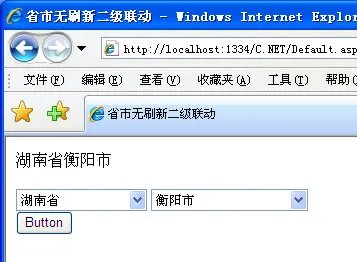
你自己能确定是不是因为AJAX发起请求后,处理页面则认为是无效来源而造成无法正常回发呀,你可以在你的处理页面验证一下,打印出来看一下的呀,你要一步步去确定问题出在哪才能找到解决办法的呀,
<%@ Page Language="C#" AutoEventWireup="true" CodeFile="Default.aspx.cs" Inherits="_Default" EnableEventValidation="true" %>
这里把EnableEventValidation="true"改成EnableEventValidation="false"就不会报错了